

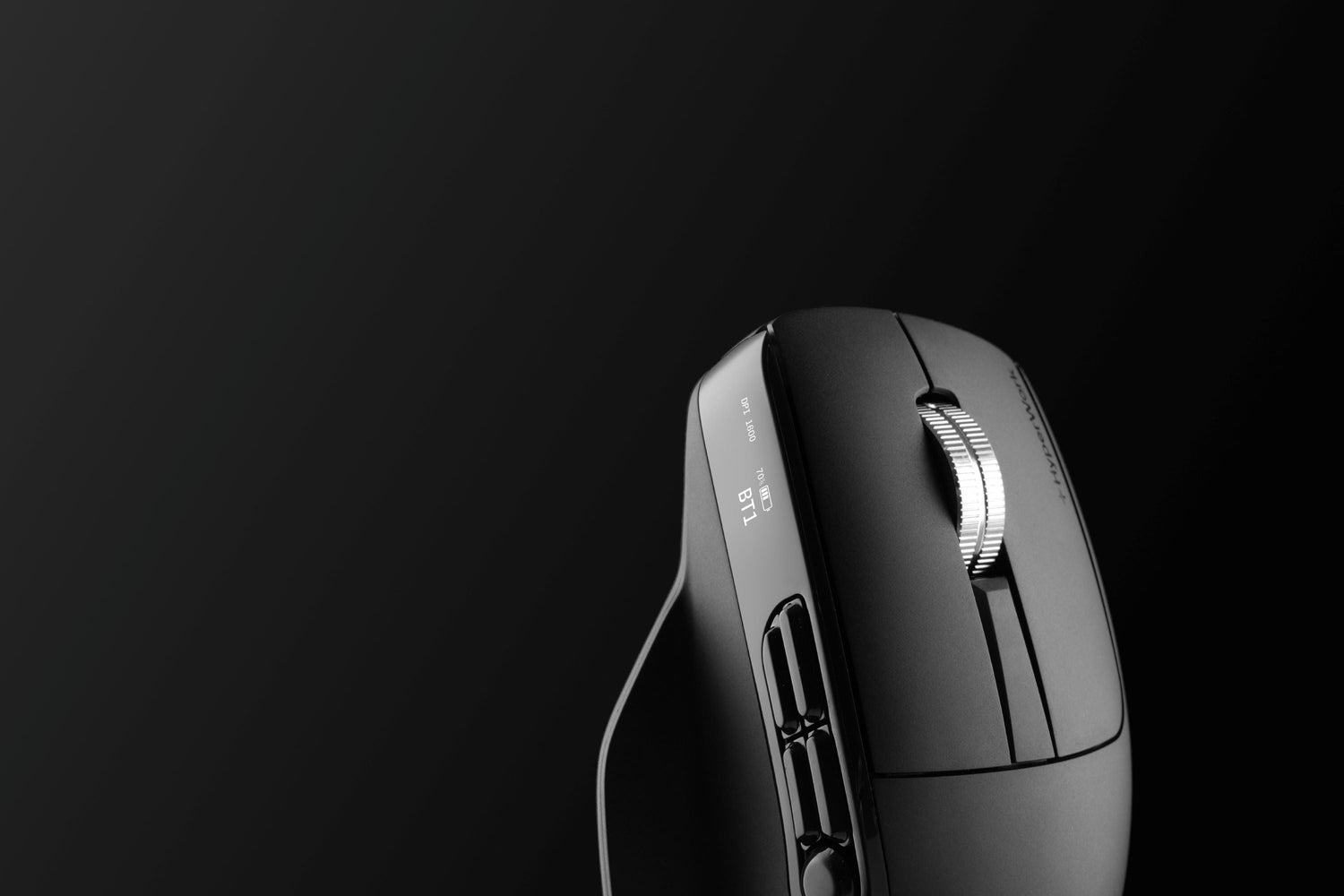
Personalized for every user, the HyperWork Macro is a mouse designed for both office tasks and basic gaming, providing a versatile 2-in-1 solution with an impressive design and flexibility for all needs.
Customizable software for button mapping
Macro is the first HyperWork product to utilize custom software following the Helios gaming mouse. Users can install the app on Windows or macOS to assign keys or 1-click shortcuts to up to 9 functional buttons.

Macro encourages users to personalize their workflow based on work habits, increasing processing speed and reducing repetitive tasks for multi-tasking professionals across various fields (gaming, web browsing, graphic design, data analysis, etc.).

PixArt sensor with glass surface tracking
PixArt is renowned for its advanced tracking algorithms, allowing the Macro mouse to operate stably even on glass surfaces—a surface where most office mice lose signal.
This is one of the most valuable features that helps the Macro maintain high precision and flexibility in any workspace, supporting fast response and accurate tracking at high DPI levels such as 3200-6000 (large resolution screens, multi-monitor setups, etc.).

Quiet and durable silent switches
The Macro mouse uses Silent Huano switches with a lifespan of 30 million clicks—quiet, noise-free, light actuation force, and short travel while still maintaining tactile bounce and accurate feedback.

Wide DPI range
Macro supports DPI customization from 800 to 6000, suitable for various tasks, from office operations requiring stable precision to gamers needing fast response speeds.
The wide DPI range allows users to switch flexibly between sensitivity levels with just one button, optimizing speed and accuracy in every situation. Notably, a DPI of up to 6000 is a specification appearing for the first time in a HyperWork mouse.

Double the battery life of office mice
As a high-performance multi-tasking mouse, the Macro features a 750 mAh battery capacity with up to over 2 months of use without charging. Delivering extreme performance is the strength of this hard-core mouse model.
Intuitive monitoring with digital display
Integrated into the side of the Macro, a digital screen provides information on battery percentage, status, connection mode, and DPI.
This major differentiator from common mice makes the Macro a unique hi-tech design for both office and gaming users.

Multi-OS compatibility, multi-device connection
Macro fully supports Windows and macOS via software, while flexibly connecting to multiple devices thanks to stable, low-latency wireless standards.

Users can quickly switch between laptop - PC - tablet, making it especially suitable for flexible work environments or the need for parallel use between entertainment and work.

Ergonomic design
Designed to fit the hand's natural movement with a side thumb rest to prevent fatigue during hours of continuous use, the Macro mouse is a worthy companion for both work and play.





Leave a comment
This site is protected by hCaptcha and the hCaptcha Privacy Policy and Terms of Service apply.